PDF to Markdown Converter
Convert digital PDFs into clean, structured Markdown with preserved headings, tables, and lists — 100% locally in your browser with zero uploads.
Drop a PDF file here, or browse from your device
Processed locally via client-side PDF parsing. Files never leave your computer.
Real Input vs. Clean Output
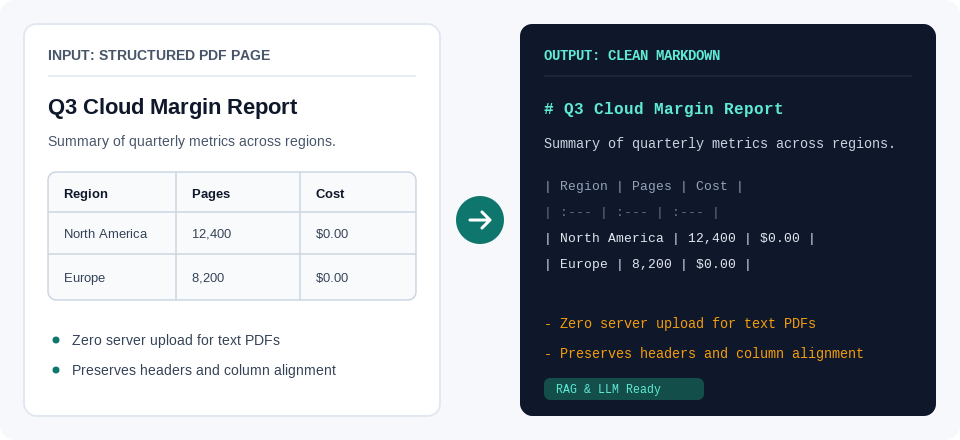
See how coordinate-aware extraction turns messy PDF layouts into readable Markdown without server uploads.
Built for Clean Structure, Not Raw Text Dumps
- Privacy-First Local Processing PDF files stay in browser memory. Zero uploads, zero third-party retention, safe for NDAs and financial filings.
- Structure-Aware Extraction Detects headings by relative font scale, rebuilds GFM tables by column coordinates, and fixes wrapped lines.
- Built for RAG & Knowledge Workflows Check approximate token counts immediately and copy Markdown or download .md and .csv files in one click.
How It Works in 3 Steps
-
Drop a PDF or Load a Sample
Drag a text-based PDF into the dropzone or click one of the three built-in sample documents.
-
Pick Your Formatting Options
Choose whether to detect GFM tables, strip page numbers, add page dividers, or switch to LaTeX mode.
-
Copy or Download Clean Output
Inspect raw Markdown, live HTML preview, or CSV tables, then copy or download in one click.
Why Use a Browser-Local PDF to Markdown Converter?
Every PDF to Markdown Converter tries to solve the same messy problem: PDFs store visual coordinates rather than clean semantic structure. When you copy and paste directly from a PDF reader, paragraphs break mid-sentence, multi-column tables collapse into unreadable strings, and page numbers interrupt every section.
OCR2MD runs directly inside your web browser. Instead of uploading sensitive financial statements, legal agreements, or research papers to a third-party server, our client-side PDF to Markdown Converter inspects font sizes, line coordinates, and column spacing locally on your machine. You get clean, structured Markdown ready for Obsidian, Notion, GitHub READMEs, or LLM retrieval pipelines in seconds.
What Makes Our PDF to Markdown Output Clean
Most generic extractors dump raw text without preserving document hierarchy. OCR2MD applies four geometric passes on every page so the converted Markdown actually works without heavy manual cleanup:
- Heading Hierarchy Inference: By measuring the median body font size across your document, larger bold lines automatically map to
#,##, and###headings. - GitHub Flavored Markdown (GFM) Tables: Words aligned across horizontal X-axis columns are grouped into
| Column | Value |Markdown tables, and simultaneously extracted into downloadable CSV format. - Hyphenation & Line-Break Repair: Broken lines caused by fixed PDF page margins are joined back into natural paragraphs, while trailing hyphenated words are reconnected cleanly.
- Honest Scanned-Page Detection: If a page contains only flat images with zero selectable text layer, OCR2MD flags that page clearly instead of returning silent blank output, and points you to our AI OCR Cost Calculator to evaluate cloud vision models.
Preparing Documents for RAG, LLMs, and Knowledge Bases
Modern AI engineering teams prefer Markdown over raw PDFs when building Retrieval-Augmented Generation (RAG) indexes. Clean Markdown reduces token waste by stripping redundant layout noise and gives chunkers clear heading boundaries (## and ###) so answers stay grounded in the right section.
With our built-in word and approximate token counter, you can verify how many LLM tokens a paper or manual will consume before pasting it into Claude, ChatGPT, or a vector database. Need academic syntax instead? Switch to LaTeX Output Mode in the options panel or visit our PDF to LaTeX Converter. If you are evaluating server-side pipelines for scanned archives, explore our Docling PDF to Markdown Guide and Mistral OCR vs DeepSeek-OCR 2 comparison.
Supported Document Types & Limitations
OCR2MD works best on digital (text-based) PDFs exported from Word, Google Docs, LaTeX, Notion, financial systems, or web browsers. Because conversion happens locally via JavaScript with zero server GPU usage, it runs instantaneously at no cost and keeps confidential files completely private. For photographed receipts, handwritten notes, or legacy scanned PDFs without embedded text, you will need a vision-language OCR model covered in our AI OCR guide.
Related Converters & OCR Guides
Frequently Asked Questions
Are my PDF files uploaded to a server when using this PDF to Markdown Converter?
No. OCR2MD processes text-based PDF files locally inside your browser using JavaScript. Your documents are never uploaded to our servers or stored remotely.
Can this PDF to Markdown Converter preserve tables?
Yes. Enable the Detect Tables (GFM) option in the workbench to group aligned horizontal columns into GitHub Flavored Markdown tables and download them as CSV.
What happens if I upload a scanned image PDF?
When a page has no embedded text layer (such as a camera photo or flat scan), OCR2MD detects it honestly and warns you which page needs a vision OCR engine like DeepSeek-OCR 2, Mistral OCR, or Docling.
Is there a page limit or signup requirement?
Yes. You can convert multi-page documents for free without creating an account, or enter a custom page range like 1-10 to extract only the sections you need.
Can I export LaTeX instead of Markdown?
Yes. Toggle LaTeX Output Mode in the Extraction Options panel or open our dedicated PDF to LaTeX Converter page to export \section and \begin{tabular} blocks.
No comments yet. Let us know how your PDF converted or which document format you want next.